

Download Barcode Scanner APK – barcode scanner, product lookup, QR code reader, Android app, free tool, shopping aid, book ISBN scanner, app download
Overview
Barcode Scanner is a lightweight Android application designed to help users quickly access product information by scanning barcodes and QR codes using their device’s camera. The app enables real-time product lookup, offering users the ability to retrieve details such as pricing, reviews, and availability. It is particularly useful for shoppers, readers, and tech-savvy individuals seeking instant access to product data.
The tool also supports the scanning of QR codes to directly access Android Market pages, allowing users to download applications without manually entering lengthy URLs. This functionality streamlines app discovery and installation, especially when accessing digital content from printed or online sources. While the app was developed by Google, no further details about the company’s role in its development or ongoing support were provided.
The software operates entirely on the Android platform and is intended for use in retail environments, libraries, bookstores, or personal shopping scenarios. Its primary purpose is to bridge the gap between physical products and digital information, making it a practical utility for everyday users who value quick, on-the-go access to product details.
Key Features & Capabilities
- Barcode Scanning – Uses the device’s camera to scan standard barcodes on consumer products, enabling instant lookup via Google search.
- QR Code Reader – Recognizes QR codes linked to Android Market applications, allowing direct navigation to app download pages.
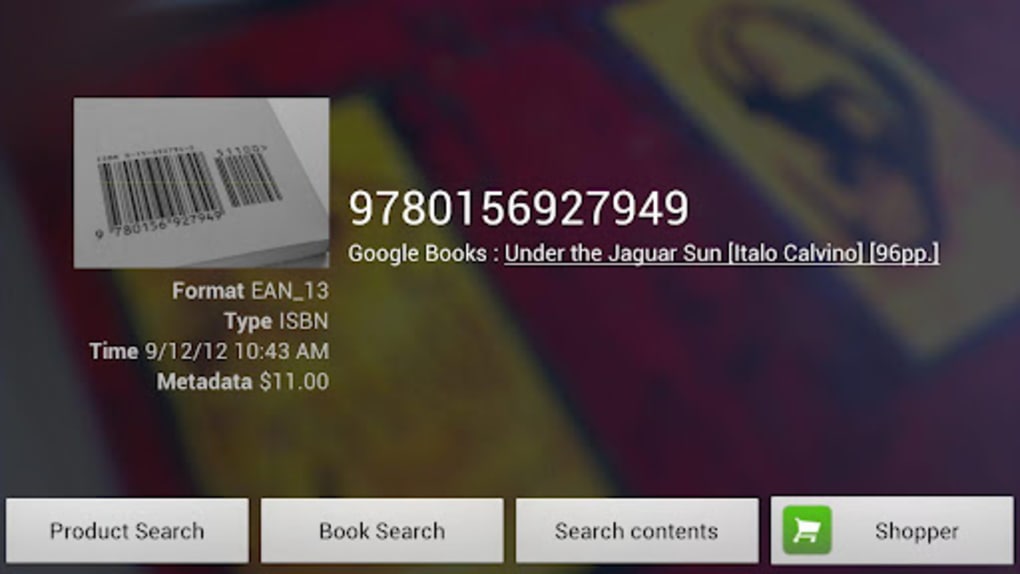
- ISBN Recognition – Demonstrates higher accuracy when scanning book ISBN codes, directing users to Amazon’s review pages for detailed insights.
- Product Information Access – Provides links to online databases and review platforms, helping users make informed purchasing decisions.
- Seamless App Installation – Simplifies the process of downloading Android apps by scanning QR codes from websites or printed materials.
These features are particularly effective in retail settings, where users can scan products to compare prices or read customer feedback. For readers, the app’s ability to scan ISBNs and access Amazon reviews enhances the book discovery experience. The QR code functionality is ideal for developers, marketers, or individuals sharing app links through visual media. While performance varies across different product types, the app remains a reliable tool for specific use cases, especially when accuracy is highest for structured data like ISBNs.
User Interface, Workflow & Performance
The user interface of Barcode Scanner is minimalistic and focused on functionality. Upon launching, the app displays a live camera feed with a rectangular frame to guide barcode alignment. Yellow dots move across a red scanning line, indicating active processing.
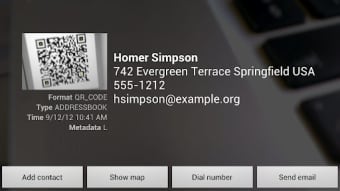
Once a match is found, the app presents a result with a link to Google or the Android Market, depending on the code type. Navigation is straightforward, requiring no setup or configuration. The workflow is intuitive: point, align, scan, and act.
The app responds quickly to valid barcodes, though recognition success depends on lighting, barcode clarity, and camera focus. Performance observations are based on general software behavior patterns, as no official benchmarks or resource usage metrics were provided. The developer did not specify CPU or RAM usage details.
Stability appears consistent under normal conditions, but the app may struggle with low-contrast or damaged barcodes. Overall, the interface prioritizes speed and simplicity, making it accessible to users of all technical levels.
Compatibility & System Requirements
Barcode Scanner is designed for the Android operating system and is compatible with devices running the specified version. The application has a file size of 1.8 MB, indicating a lightweight footprint that should not strain storage on most Android devices. The developer did not provide additional system requirements, such as minimum processor speed, RAM, or camera specifications.
Compatibility information was partially provided, with the app confirmed to run on Android devices. No details were shared about support for tablets, wearables, or other form factors. Users should ensure their device has a functional camera and internet connectivity for optimal performance.
The lack of detailed hardware requirements means that users should rely on general Android compatibility standards when installing the software.
Pros and Cons
Pros
- Free to download and use with no in-app purchases
- Simple, intuitive interface ideal for casual users
- High accuracy for ISBN scanning and book-related data retrieval
- Enables quick app downloads via QR code scanning
- Lightweight size (1.8 MB) with minimal storage impact
Cons
- Recognition rate varies; not consistently accurate across all product barcodes
- Dependent on external services (Google, Amazon) for data retrieval
- Performance may degrade in poor lighting or with damaged barcodes
- No offline mode for product lookup or QR code processing
- Limited support for non-Android platforms
FAQ Section
Is Barcode Scanner available for iOS devices?
Barcode Scanner is designed exclusively for Android devices. There is no official version available for iOS.
Is the app safe to download and use?
As a free tool developed by Google, Barcode Scanner is considered secure when downloaded from official sources. Always ensure you install apps from trusted platforms to maintain device safety.
Does the app require an internet connection?
Yes, an active internet connection is required for barcode and QR code lookup, as the app relies on external services like Google and the Android Market to retrieve data.
Can I use Barcode Scanner to download apps from any source?
The app is designed to link to apps in the Android Market. It cannot be used to download apps from third-party stores or unofficial sources.
How often does the app receive updates?
Update frequency was not specified. Users should check the official Android Market listing for the latest version and patch notes.
Final Thoughts + CTA
Barcode Scanner remains a practical and accessible tool for Android users seeking to explore product details or download apps via QR codes. While its barcode recognition accuracy is inconsistent across different product types, it excels in specific scenarios—particularly when scanning ISBNs and accessing book reviews. The app’s lightweight design, free access, and seamless integration with Google and the Android Market make it a valuable utility for shoppers, readers, and tech enthusiasts.
Its simplicity and focus on core functionality set it apart from more complex alternatives. For those who frequently scan products or share app links visually, Barcode Scanner offers a convenient, no-frills solution. Despite limitations in universal recognition, its strengths in targeted use cases justify its continued relevance.
Download Barcode Scanner now to enhance your shopping and app discovery experience.





.png)

